What's New — One plan for your care, whether it's just you or a whole team.
One place to see what needs doing and who's doing it, with notes and conversations kept next to the records they're about, whether you manage your care on your own or share it with others.
The demo is free to explore — no account required.
This month is about something all of us juggle every day: keeping track of who's doing what. Maybe you're managing your own care and handling every follow-up, refill and phone call yourself. Or maybe you're coordinating your loved one's appointments while another family member handles driving them there. Either way, you shouldn't have to keep it all in your head or scroll back through a group text to find out who said they'd call the pharmacy.
If it's just you, none of this needs a team. Tasks work as your own care to-do list, your notes stay on the record they're about, and one page shows where everything stands. Down the road, we want you to be able to connect with an advocate through NaviaCAIR or bring your own, and the plan you keep now is what they'd step into.
If others help you, or you help someone else, everyone can finally see the same plan in one place, right next to the records.
Here's what's new in September:
Care Team home — open one page and know where things stand, without calling around or scrolling through old texts. It shows what's still open, what nobody has picked up yet, who's going to which appointment, and what changed since you last checked.
Tasks and handoffs — nothing slips, whether the list is all yours or shared with others. Every task has a named owner, and if you ask someone to take one over, it stays yours until they actually say yes.
Discussions and messages — questions and answers stay attached to the lab result, appointment or task they're about, so you're not hunting for who said what. Everything else goes in one private thread for the people you've chosen.
Care Team home
See everything that's happening in your care from a single page
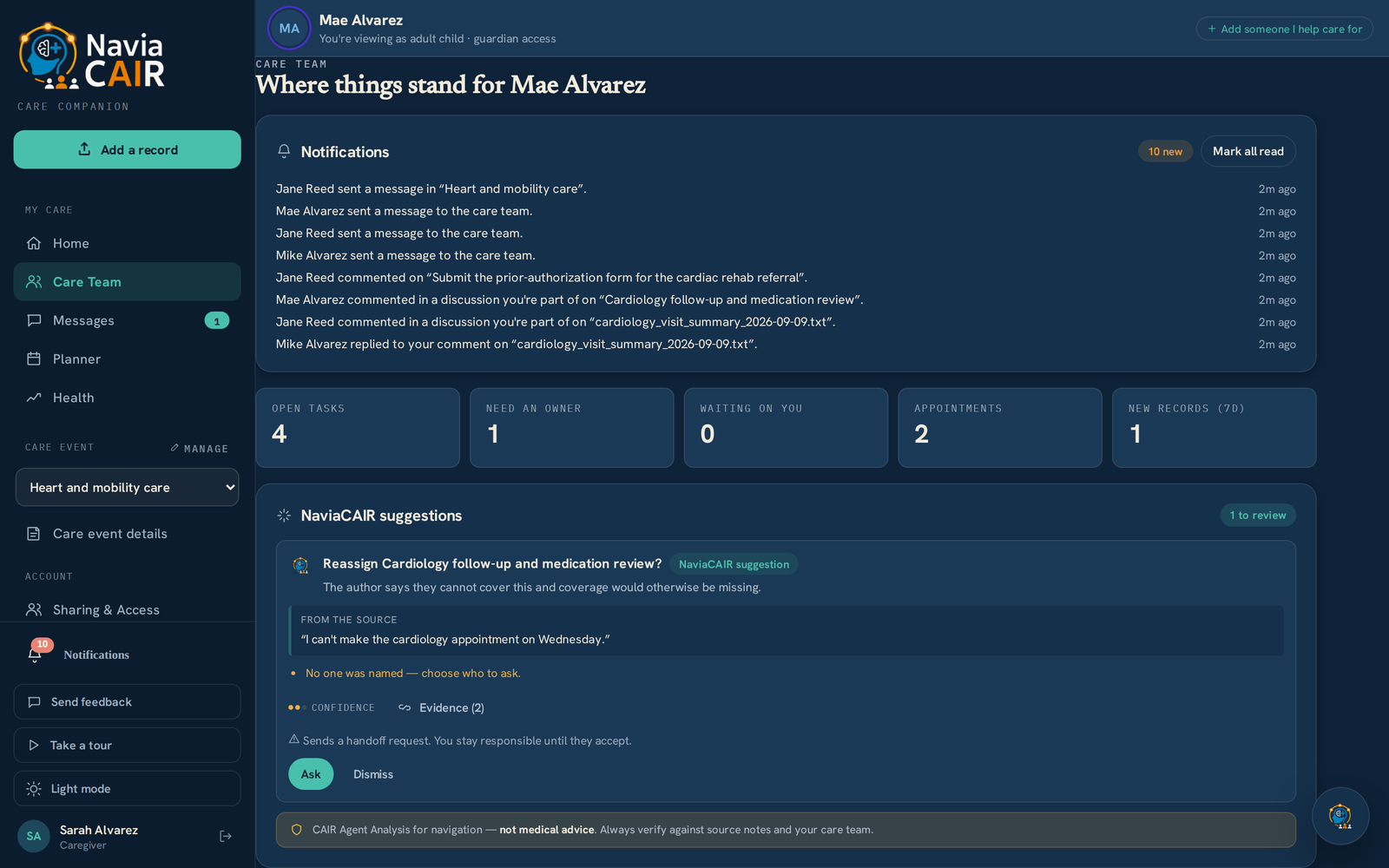
There's now a Care Team page for your own care and for each person you care for. It opens with the things that need a decision — open tasks, tasks nobody has claimed, requests waiting on you — then the upcoming appointments and who's attending, and any records added this week.
When others are involved, the page lists the people helping and what each one covers, whether that's appointments, medications, transportation, insurance or referrals. One person is marked as primary coordinator so it's always clear who is steering. The page works the same way on a phone.
Sarah, the primary coordinator, opens her mother Mae's Care Team page. Tap to open it full size.
Since you last checked: when you come back after a day away, the page opens with a short summary of what changed, including new records, tasks someone has taken on, appointments that were scheduled and requests waiting for your answer. It gives you the handful of things that matter rather than every event, with a link through to the full detail.
What Mike, Mae's son, sees when he checks back in, with a link through to the rest.
Full Report — September 2026
Read the complete update
Enter your details for full access — we'll keep you updated as NaviaCAIR grows.
Tasks and handoffs, so everyone knows who is taking care of what
Discussions that stay next to the record, appointment or task they're about
Private care-team messages, linked to what they're about
What this means for you, and what's coming in October
No spam. We respect your privacy.
Tasks and handoffs
Know exactly who is taking care of each task
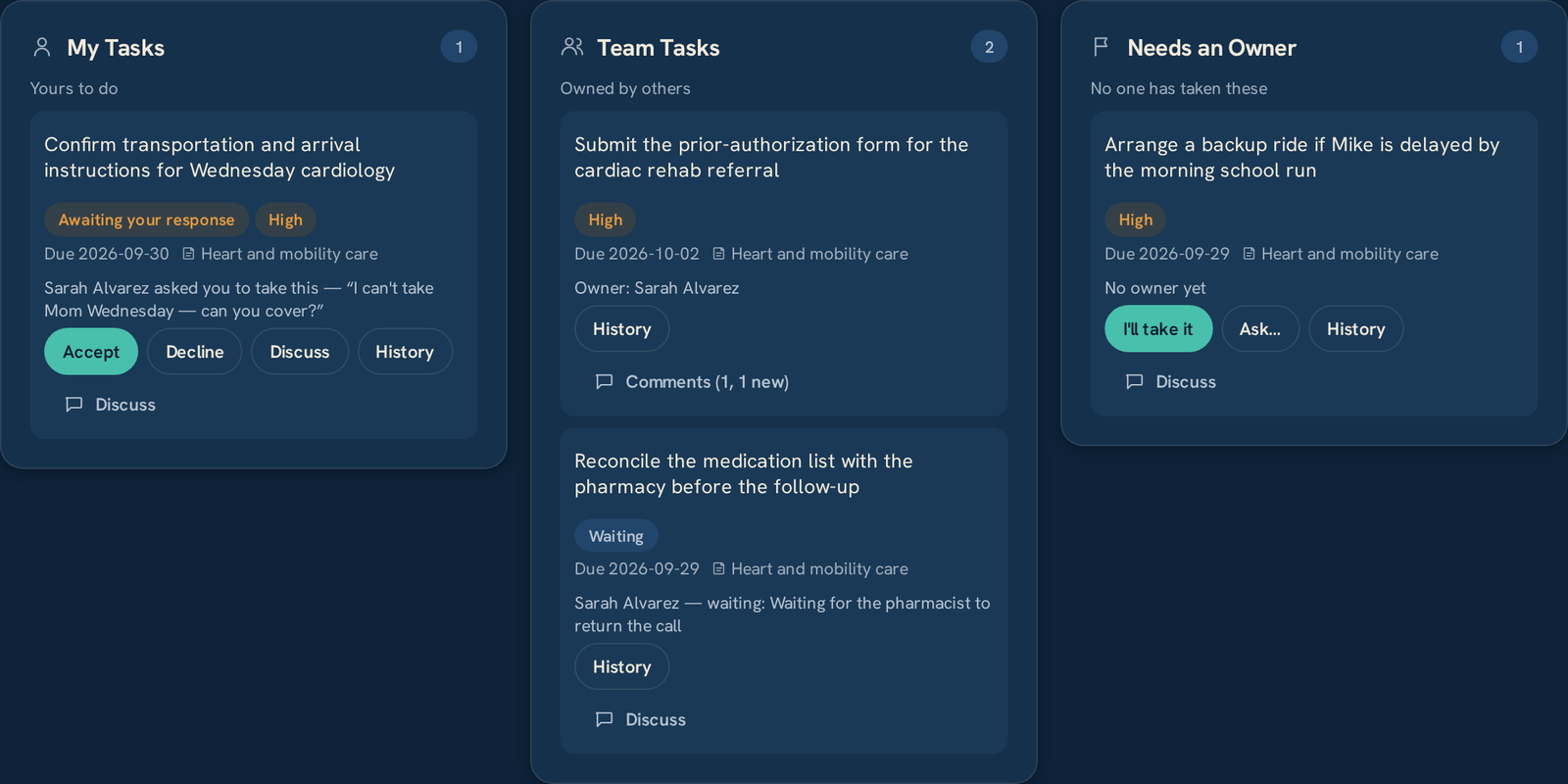
Things usually get missed when it isn't clear whose job they are. Every task now sits in one of three places, My Tasks, Team Tasks or Needs an Owner, and anyone can claim an unowned task with a single tap on “I'll take it.”
If you can't make something, you can ask someone else on the care team to take it over, and they can accept, decline or talk it through with you first. The task stays yours until they accept, so nothing is left without an owner in between. Appointments work the same way, with everyone able to see who's attending, and each handoff is kept in a history you can open from the task.
Sarah has asked Mike to take Wednesday's cardiology visit, and he can accept, decline or talk it through first. Tap to open it full size.Discussions and messages
Keep conversations next to the records they're about
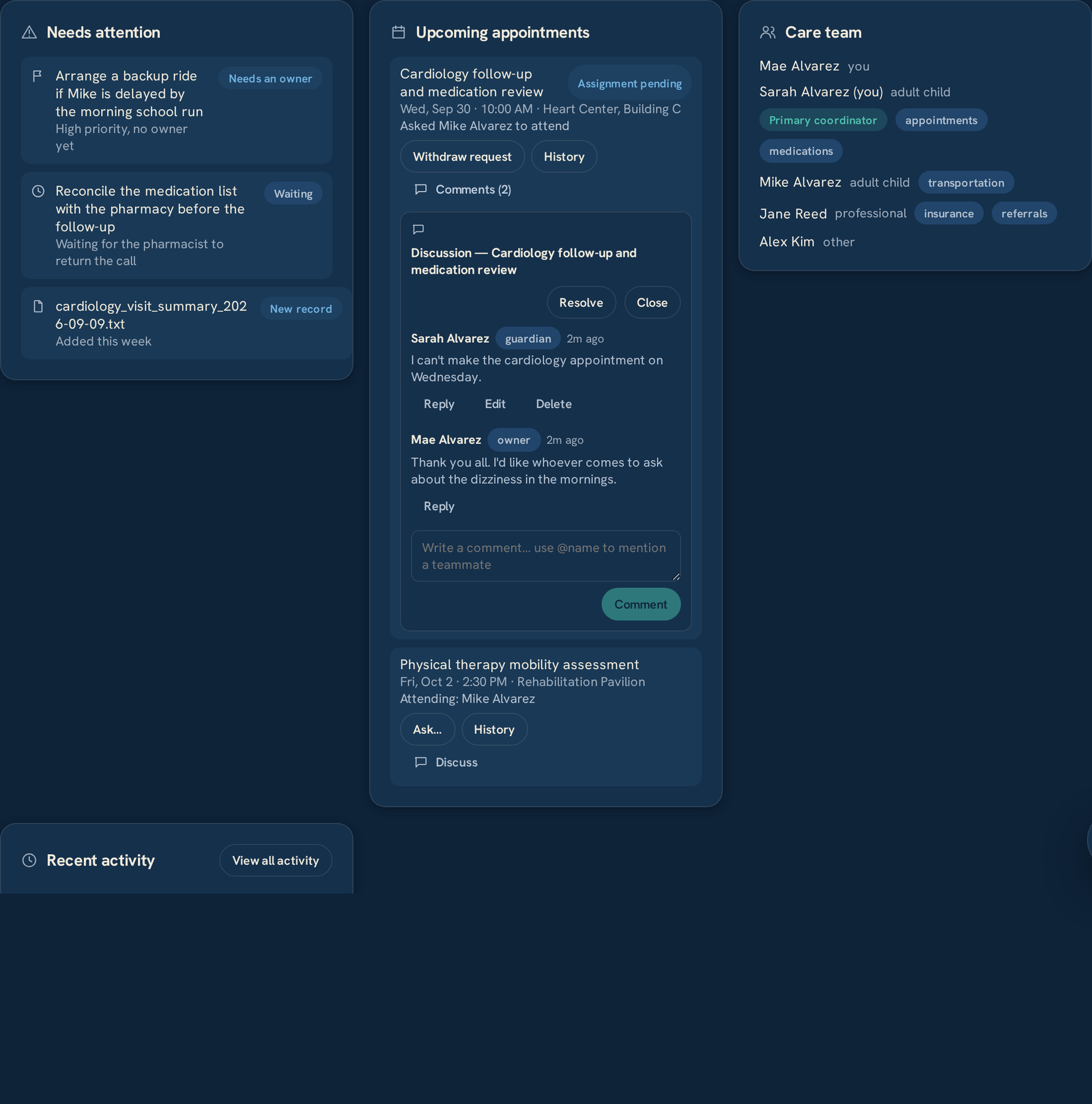
You can now comment directly on a record, an appointment, a task, a medication or a notebook entry. The discussion stays attached to what you're talking about, so the question about Wednesday's cardiology visit is on the visit — not buried in a thread from last Tuesday. Mention someone with @name, and resolve the discussion once it's settled.
Each person's role, whether owner, guardian, caregiver or advocate, appears beside their name so it's clear who's speaking. The patient is part of the conversation too, and in the example below Mae adds the questions she wants asked at her own appointment.
A discussion on the cardiology appointment, with the care team listed on the right and what each person covers. Tap to open it full size.
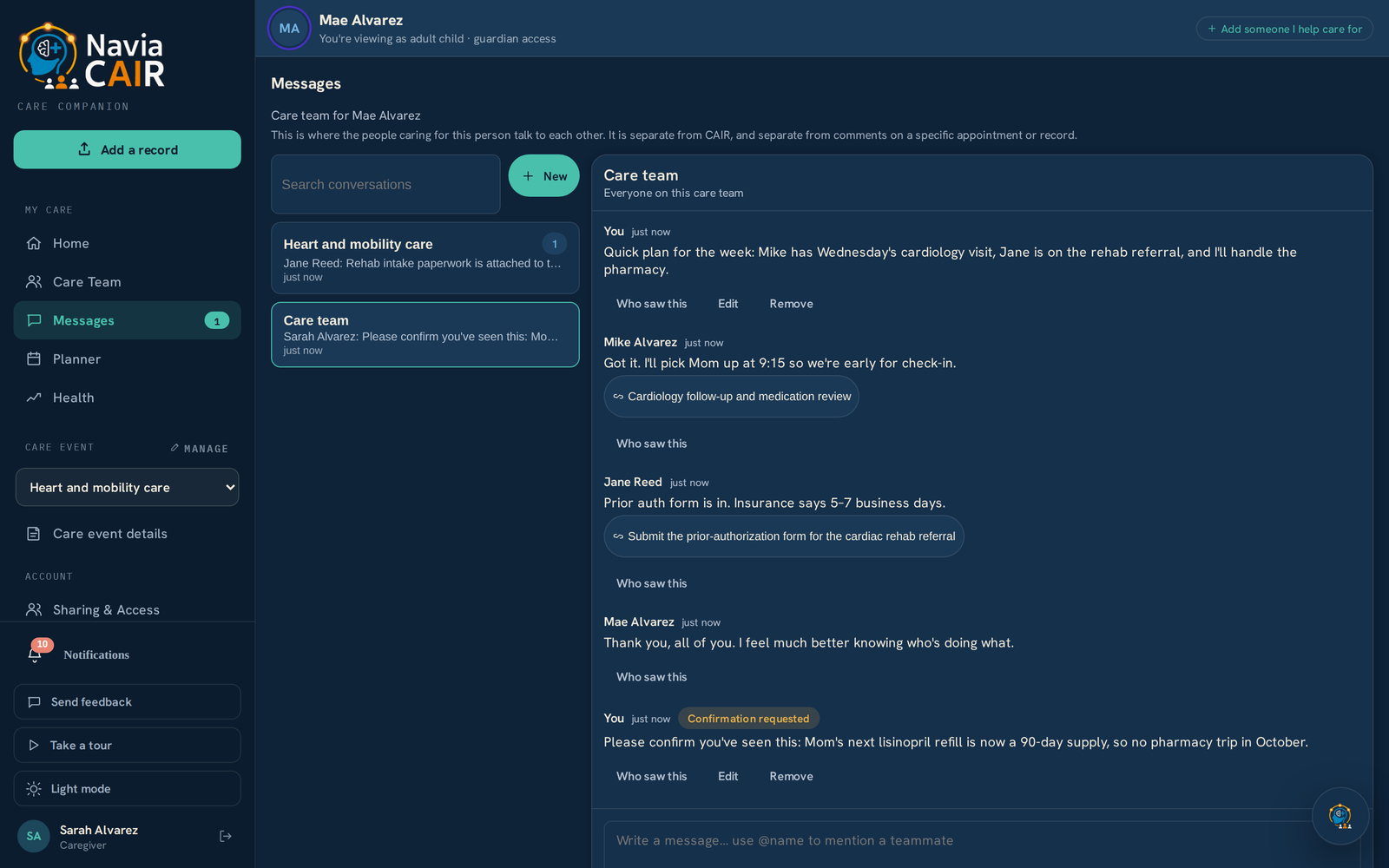
Care-team messages: for everything else, each person you care for has a private team thread, and you can also message people one to one. You can link a task or appointment into a message, so “I'll pick Mom up at 9:15” points to the visit it's about, and for important messages you can ask for confirmation and see who has read it.
Messages are encrypted and kept separate from your medical record. They go to the people on your care team, so anything meant for your doctor's office is still best sent through their portal or by phone.
The team thread for Mae, where linked items point to the appointment or task each message is about. Tap to open it full size.
What this means for you
If you're managing on your own
Everything here works for one person, with nothing to set up and no one you need to invite. Tasks keep track of the follow-ups, refills and calls on your list, and notes on a record or appointment keep your questions ready when the visit comes. Down the road, we want you to be able to connect with an advocate through NaviaCAIR or bring your own, so the plan you keep now is ready for them. If you ever want help sooner, inviting someone takes about a minute and you decide what they can see.
If others help with your care
You can see exactly who is doing what on your behalf and add your own wishes to the same conversation. You decide who is on your team and what each person sees, and if you remove someone, they immediately lose access to the discussions and messages along with the records.
If you care for someone
The week's plan, the handoffs and the open questions now live in one place next to the record, instead of scattered across group texts. When you ask someone to cover, you'll know whether it's been picked up, and you can catch up after a day away in a few lines, all from your phone.
If you're an advocate
Join a client's care team with the advocate role: comment on records and appointments, message the family, and track and discuss referrals, prior authorizations and insurance follow-ups in the conversation attached to each task. Your role appears beside your name, and if a client ends your access, you lose everything along with it.
See it for yourself in the demo
Explore the Care Team page, tasks and handoffs, and discussions on the record — no account required.
Whether you manage your care alone or with a whole family, we'd like to hear how you keep track of it today — the group texts, the shared calendar, the notebook by the phone. It directly shapes what we build next.
What we're finishing next, all built on this month's care-team work.
01
Notifications you control
Be told about handoffs, mentions and messages the way you want, and turn off the rest.
02
A full activity timeline for the team
Everything that happened for the person you care for, in order, filtered by who did it and what it was about.
03
Automatic suggestions from NaviaCAIR
NaviaCAIR will automatically recommend next steps so nothing gets missed. When a note or message mentions something that needs doing — a task, a handoff, a question for the visit — it offers to set it up for you. It never acts until a person says yes.
04
On a portal we don't support yet?
Tell us which one you use and we'll look into building a connector for it. Knowing where you're treated is what gets that started.
Privacy & trust · You decide who sees what.
You decide who's on your team and what each person sees. Access is explicit, and removing someone takes it all back at once — records, discussions and messages.
Care-team messages are encrypted and kept separate from your medical record.
Identifying details are masked before your record reaches the AI, and we never see your portal password.
Your records are never used to train public AI. We're committed to privacy, security, and ongoing compliance as we grow.
“Whether you manage your care alone or with a whole family, I'd love to hear how you keep track of it today, because it directly shapes what we build next. Thank you for being part of this early group.”
— Nathan, NaviaCAIR
Important
NaviaCAIR is an informational tool and does not provide medical advice, diagnosis, or treatment. Always consult your healthcare provider.
Care-team messages and comments reach the people on the care team, not a clinician. For anything urgent, call the provider or 911.
Everyone pictured above is from a synthetic account — the Alvarez family and every name, date and detail are invented.
You control what data you upload, share, and manage.
Want to explore or get involved?
If you haven't tried NaviaCAIR yet, you can look around the demo without signing up, or we'll help you build your own Care Story for free.